
SP4CEBAR 2022-11-04 15:47 (Edited)
note: notes above 96.62 have a frequency that's too high for NX to handle
SUB PLAY_(V,N)
  A=$FF40+12*V
  POKEW A,16*16.35*2^((N-1)/12)
  POKE A+2,PEEK(A+2) OR %11000000
END SUB
While making this I wrote the TOUCH_CELL(B,X,Y) function
Which uses sprites to figure out what BG and what cell have been touched
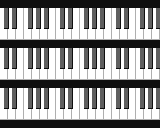
Also, the piano is generated (SUB PIANO), and so are the notes (SUB KEYSKIP)
SP4CEBAR 2024-07-02 10:27
This demo may very well have been inspired by the piano on the Garage Band iPad app
SP4CEBAR 2026-03-25 13:41
By the way, is it out of tune?
NerdPenguin2836 2026-03-28 22:36
yeah sounds about 80c flat when I don't move the cursor off the note
SP4CEBAR 2026-04-03 12:25
thanks for confirming!
