
qwaffe 2026-04-14 15:08 (Edited)
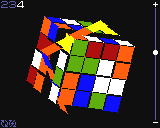
To shuffle: Touch and hold the first icon at the bottom left
To shuffle faster: Touch and hold the second icon at the bottom left
slow and buggy, of course
Update: faster panning and shuffle
Timo 2026-04-14 20:26
Cool
Software Center 2026-04-15 01:15
Cool I like it
*^~ I| Raichu |I ~^* 2026-04-15 02:39
they should rename this app 3D NX.
was8bit 2026-04-15 06:50
I tried to read thru the code... but about halfway thru my brain went "poof" and flatlined ;)
moechofe 2026-04-16 08:03
This is very impressive
Software Center 2026-04-17 00:56
i tried to solve it! Then I mentally gave up because it wasn’t turning the right way and my brain was hurting by the physics
was8bit 2026-04-17 04:38
Controls are abit tricky... but are learnable...
Train yourself on moves by simply practicing each movement over and over until you get consistency
.... even then, it may sometimes act up...
Best practice is to carefully drag your movements... while still holding your finger down, you can easily and slowly undo a movement you did not want
... so go slow... be ready to undo, and dont lift your finger until you are sure it is what you want or have put it back ...
qwaffe 2026-04-17 12:13 (Edited)
Thanks all and @was8bit, even though the controls really are clunky..
was8bit 2026-04-17 15:31 (Edited)
Once you get used to them, its easy
The trick that helped me was to stop "flicking/spinning" and just do slow drags, and only release your drag once your sure its what you want.... THEN its easy ;)
When you are doing a real cube, you can flick/spin at a high rate... this approach doesnt work here... gotta go slow ;)
SP4CEBAR 2026-05-09 19:35 (Edited)
very impressive! Controls are easy on PC by the way
I'm guessing each cube face is a sprites of size 3 (the level 4 cube would then have 48 sprites) and the cube makes use of five unique 4x4 character images (one for each face, and two for rotating a segment)
qwaffe 2026-05-11 04:58
@SP4CEBAR Thanks... pretty much, yeah !

