Contest for placeholder program of online NX editor
SP4CEBAR 2026-05-12 14:23 (Edited)
What do we have right now
Upon opening sp4cebar.com/nx-editor/ you are greeted with the program below.
PRINT "HELLO WORLD"
TOUCHSCREEN
DO
  SPRITE 0, TOUCH.X-4, TOUCH.Y-4, 193
  WAIT VBL
LOOP
What am I looking for
The current program is both simple and interactive but it looks a bit boring. So I think it is time for a replacement. That's why I ask you help, if you want to contribute please consider the requirements below and have fun :)
Requirements
- Needs to be simple and easy to understand and modify by just looking at the code
- Tip (added later): try to make it using around 15 lines of code (and then perhaps some data)
- Needs to be interactive, perhaps a simple game or interactive art
- Needs to looks good
- [optional] please upload it to this NX forum so I can link to it as well
Considerations
- Users of the online NX editor can't use disks and can therefore not use GFX designer to make graphics, so including some fun graphics is a plus.
- Mobile users can't use a keyboard (unless they have a bluetooth keyboard) so using keyboard input is not recommended. The joystick/gamepad (one and two player) and touchscreen however are both supported.
- You can use the gamepad and touchscreen at the same time by running
POKE $FF76,%1001instead ofGAMEPADorTOUCHSCREEN(see this program), although this will look like total magic to newcomers, it does allow you to demonstrate both the touchscreen and joystick capabilities of NX and the online editor which is a plus.
Attributions
I will link the NX topic url of the program.
Multiple Winners
If there are multiple good submissions I may add them both, I could for example select one randomly each time the editor page is loaded.
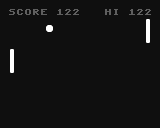
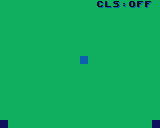


SP4CEBAR 2026-05-14 17:49 (Edited)
Thank you! I like them!
The pong game's code seems be a bit long and hard to understand and tweak for a beginner. I may try to strip it.
moechofe 2026-05-15 08:04
You can simplify it by removing the part that compute the new angle when the player paddle hit the ball. And remove the speed increase too.
moechofe 2026-05-15 08:14 (Edited)
Did you know about https://microsoft.github.io/monaco-editor/ ? It's the javascript editor engine that run under the hood of vscode and it's pretty easy to integrate inside a web page.
SP4CEBAR 2026-05-17 14:34
That's very interesting, I may look into that once, thank you!